Many times we face situation like, we need to send image in the html body of the mail that too using CDO.
Suppose we have an image at local server from where MailSend Code will get fire, here is the code:
Add this line of code to your CDO code to send image as a mail body:
Set objMessage = CreateObject("CDO.Message")
Set objBP = objMessage.AddRelatedBodyPart("C:\Users\Varun.Sharma\Shell\1.jpg", "1.jpg", CdoReferenceTypeName)
objBP.Fields.Item("urn:schemas:mailheader:Content-ID") = "<1.jpg>"
objBP.Fields.Update
Here, in AddRelatedBodyPart,
argument 1 is : physical location of image
argument 2 is : identifier of the image (any name)
argument 3 is : To tell CDO to send the image as well
In next line, just put image identifer to the right hand side.
When sending mail refer the image in html body like this:
mail.HtmlBody="<img src=1.jpg" >
For full code of sending mail using CDO, check the following link:
How to send mail using cdo in vbscript
Tuesday, July 21, 2009


Sunday, July 5, 2009
Learning UML with C#
UML is a simple diagramming style that was developed from work done by Grady Booch, James Rumbaugh, and Ivar Jacobson, which resulted in a merging of ideas into a single specification and, eventually, a standard.
Here , We will see how to map a class and its relation in UML.
Basic UML diagrams consist of boxes representing classes. Let’s consider
the following class (which has very little actual function).
Basic Class :
public class Person {
private string name;
private int age;
//-----
public Person(string nm, int ag) {
name = nm;
age = ag;
}
public string makeJob() {
return "hired";
}
public int getAge() {
return age;
}
public void splitNames() {
}
}
We can represent this class in UML, as shown in Figure
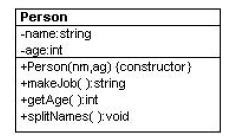
The top part of the box contains the class name and package name (if any).
The second compartment lists the class’s variables, and the bottom compartment lists its methods. The symbols in front of the names indicate that member's visibility, where "+" means public, "-" means private, and "#" means protected. Static methods are shown underlined.
Abstract methods may be shown in italics or in an “{abstract}” label.
UML does not require that you show all of the attributes of a class, and it
is usual only to show the ones of interest to the discussion at hand.
Inheritance:
Now, we will look into inheritance and how to implement it in UML.
Let’s consider a version of Person that has public, protected, and private variables and methods, and an Emplo yee class derived from it.
public abstract class Person {
protected string name;
private int age;
//-----
public Person(string nm, int ag) {
name = nm;
age = ag;
}
public string makeJob() {
return "hired";
}
public int getAge() {
return age;
}
public void splitNames() {
}
public abstract string getJob(); //must override
}
We now derive the Employee class from it, and fill in some code for the getJob method.
public class Employee : Person {
public Employee(string nm, int ag):base(nm, ag){
}
public override string getJob() {
return "Worker";
}
}
You represent inheritance using a solid line and a hollow triangular arrow.
For the simple Employee class that is a subclass of Person, we represent this in UML, as shown in Figure
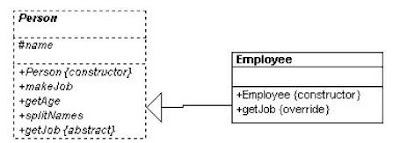
Note that the name of the Employee class is not in italics because it is now a concrete class and because it includes a concrete method for the formerly abstract getJob method.
Here , We will see how to map a class and its relation in UML.
Basic UML diagrams consist of boxes representing classes. Let’s consider
the following class (which has very little actual function).
Basic Class :
public class Person {
private string name;
private int age;
//-----
public Person(string nm, int ag) {
name = nm;
age = ag;
}
public string makeJob() {
return "hired";
}
public int getAge() {
return age;
}
public void splitNames() {
}
}
We can represent this class in UML, as shown in Figure

The top part of the box contains the class name and package name (if any).
The second compartment lists the class’s variables, and the bottom compartment lists its methods. The symbols in front of the names indicate that member's visibility, where "+" means public, "-" means private, and "#" means protected. Static methods are shown underlined.
Abstract methods may be shown in italics or in an “{abstract}” label.
UML does not require that you show all of the attributes of a class, and it
is usual only to show the ones of interest to the discussion at hand.
Inheritance:
Now, we will look into inheritance and how to implement it in UML.
Let’s consider a version of Person that has public, protected, and private variables and methods, and an Emplo yee class derived from it.
public abstract class Person {
protected string name;
private int age;
//-----
public Person(string nm, int ag) {
name = nm;
age = ag;
}
public string makeJob() {
return "hired";
}
public int getAge() {
return age;
}
public void splitNames() {
}
public abstract string getJob(); //must override
}
We now derive the Employee class from it, and fill in some code for the getJob method.
public class Employee : Person {
public Employee(string nm, int ag):base(nm, ag){
}
public override string getJob() {
return "Worker";
}
}
You represent inheritance using a solid line and a hollow triangular arrow.
For the simple Employee class that is a subclass of Person, we represent this in UML, as shown in Figure

Note that the name of the Employee class is not in italics because it is now a concrete class and because it includes a concrete method for the formerly abstract getJob method.
Friday, June 19, 2009
OOPS Part II -- Pillars of OOPS -- Inheritance, Polymorphism, Encapsulation
Part I --> OOPS Part I -- OOPS Part I -- Understanding the Object Oriented Programming
All object-based languages must contend with three core principals of object-oriented programming, often called the "pillars of object-oriented programming (OOP)":
• Encapsulation: How does this language hide an object’s internal implementation details and preserve data integrity?
• Inheritance: How does this language promote code reuse?
• Polymorphism: How does this language let you treat related objects in a similar way?
The first pillar of OOP is called encapsulation. This trait boils down to the language’s ability to hide unnecessary implementation details from the object user.
For example, assume you are using a class named DatabaseReader, which has two primary methods: Open() and Close():
// This type encapsulates the details of opening and closing a database.
DatabaseReader dbReader = new DatabaseReader();
dbReader.Open(@"C:\MyCars.mdf");
// Do something with data file and close the file.
dbReader.Close();
The fictitious DatabaseReader class encapsulates the inner details of locating, loading, manipulating, and closing the data file. Object users love encapsulation, as this pillar of OOP keeps programming tasks simpler. There is no need to worry about the numerous lines of code that are working behind the scenes to carry out the work of the DatabaseReader class. All you do is create an instance and send the appropriate messages
Closely related to the notion of encapsulating programming logic is the idea of data hiding. Ideally, an object’s state data should be specified using the private (or possibly protected) keyword. In this way, the outside world must ask politely in order to change or obtain the underlying value. This is a good thing, as publicly declared data points can easily become corrupted (hopefully by accident rather than intent!). You will formally examine this aspect of encapsulation in just a bit.
The next pillar of OOP, inheritance, boils down to the language’s ability to allow you to build new class definitions based on existing class definitions.
In essence, inheritance allows you to extend the behavior of a base (or parent) class by inheriting core functionality into the derived subclass (also called a child class).
Figure below shows a simple example. You can read the diagram in Figure as "A Hexagon is-a Shape that is-an Object."

When you have classes related by this form of inheritance, you establish "is-a" relationships between types. The "is-a" relationship is termed classical inheritance.
Here, you can assume that Shape defines some number of members that are common to all
descendents. Given that the Hexagon class extends Shape, it inherits the core functionality defined by Shape and Object, as well as defines additional hexagon-related details of its own (whatever those may be).
There is another form of code reuse in the world of OOP: the containment/delegation model
(also known as the “has-a” relationship or aggregation). This form of reuse is not used to establish parent/child relationships. Rather, the “has-a” relationship allows one class to define a member variable of another class and expose its functionality (if required) to the object user indirectly.
For example, assume you are again modeling an automobile. You might want to express the
idea that a car “has-a” radio. It would be illogical to attempt to derive the Car class from a Radio, or vice versa (a Car “is-a” Radio? I think not!). Rather, you have two independent classes working together, where the Car class creates and exposes the Radio’s functionality:
class Radio
{
public void Power(bool turnOn)
{
Console.WriteLine("Radio on: {0}", turnOn);
}
}
class Car
{
// Car 'has-a' Radio
private Radio myRadio = new Radio();
public void TurnOnRadio(bool onOff)
{
// Delegate call to inner object.
myRadio.Power(onOff);
}
}
Notice that the object user has no clue that the Car class is making use of an inner Radio object.
static void Main(string[] args)
{
// Call is forwarded to Radio internally.
Car viper = new Car();
viper.TurnOnRadio(false);
}
When you inherit a class, you get the superclass attributes and methods that you can use without instantiating a superclass object. You can only use those which are public or protected.
If you instantiate them, you make an object and upon that object you call methods defined in the object's class.
When you inherit a class, base class from which a class is derived does not have state, behaviour or identity where as if you create an instance of a class, the base class sets it's identity, state, behaviour.
When you create an instance of an object, you can access the method of the class by using dot operator (.) but if you inherit a class, you can not access base class method by using dot operator.
Use Inheritance when you are sure that you need to extend few methods of the base class or need to add some more methods to it otherwise just create the instance of the class.
The final pillar of OOP is polymorphism. This trait captures a language’s ability to treat related objects in a similar manner. Specifically, this tenant of an object-oriented language allows a base class to define a set of members (formally termed the polymorphic interface) that are available to all descendents. A class’s polymorphic interface is constructed using any number of virtual or abstract members.
In a nutshell, a virtual member is a member in a base class that defines a default implementation that may be changed (or more formally speaking, overridden) by a derived class. In contrast, an abstract method is a member in a base class that does not provide a default implementation, but does provide a signature. When a class derives from a base class defining an abstract method, it must be overridden by a derived type. In either case, when derived types override the members defined by a base class, they are essentially redefining how they respond to the same request.
To preview polymorphism, let’s provide some details behind the shapes hierarchy shown in
Figure. Assume that the Shape class has defined a virtual method named Draw() that takes no parameters. Given the fact that every shape needs to render itself in a unique manner, subclasses (such as Hexagon and Circle) are free to override this method to their own liking.

Once a polymorphic interface has been designed, you can begin to make various assumptions
in your code. For example, given that Hexagon and Circle derive from a common parent (Shape), an array of Shape types could contain anything deriving from this base class. Furthermore, given that Shape defines a polymorphic interface to all derived types (the Draw() method in this example), we can assume each member in the array has this functionality. Consider the following Main() method, which instructs an array of Shape-derived types to render themselves using the Draw() method:
class Program
{
static void Main(string[] args)
{
Shape[] myShapes = new Shape[3];
myShapes[0] = new Hexagon();
myShapes[1] = new Circle();
myShapes[2] = new Hexagon();
foreach (Shape s in myShapes)
{
s.Draw();
}Console.ReadLine();
}
}
This wraps up our brisk overview of the pillars of OOP. Now that you have the theory in your mind, the remainder of this chapter explores further details of how encapsulation is handled under C#. The next chapter will tackle the details of inheritance and polymorphism.
All object-based languages must contend with three core principals of object-oriented programming, often called the "pillars of object-oriented programming (OOP)":
• Encapsulation: How does this language hide an object’s internal implementation details and preserve data integrity?
• Inheritance: How does this language promote code reuse?
• Polymorphism: How does this language let you treat related objects in a similar way?
The Role of Encapsulation
The first pillar of OOP is called encapsulation. This trait boils down to the language’s ability to hide unnecessary implementation details from the object user.
For example, assume you are using a class named DatabaseReader, which has two primary methods: Open() and Close():
// This type encapsulates the details of opening and closing a database.
DatabaseReader dbReader = new DatabaseReader();
dbReader.Open(@"C:\MyCars.mdf");
// Do something with data file and close the file.
dbReader.Close();
The fictitious DatabaseReader class encapsulates the inner details of locating, loading, manipulating, and closing the data file. Object users love encapsulation, as this pillar of OOP keeps programming tasks simpler. There is no need to worry about the numerous lines of code that are working behind the scenes to carry out the work of the DatabaseReader class. All you do is create an instance and send the appropriate messages
Closely related to the notion of encapsulating programming logic is the idea of data hiding. Ideally, an object’s state data should be specified using the private (or possibly protected) keyword. In this way, the outside world must ask politely in order to change or obtain the underlying value. This is a good thing, as publicly declared data points can easily become corrupted (hopefully by accident rather than intent!). You will formally examine this aspect of encapsulation in just a bit.
The Role of Inheritance
The next pillar of OOP, inheritance, boils down to the language’s ability to allow you to build new class definitions based on existing class definitions.
In essence, inheritance allows you to extend the behavior of a base (or parent) class by inheriting core functionality into the derived subclass (also called a child class).
Figure below shows a simple example. You can read the diagram in Figure as "A Hexagon is-a Shape that is-an Object."

When you have classes related by this form of inheritance, you establish "is-a" relationships between types. The "is-a" relationship is termed classical inheritance.
Here, you can assume that Shape defines some number of members that are common to all
descendents. Given that the Hexagon class extends Shape, it inherits the core functionality defined by Shape and Object, as well as defines additional hexagon-related details of its own (whatever those may be).
There is another form of code reuse in the world of OOP: the containment/delegation model
(also known as the “has-a” relationship or aggregation). This form of reuse is not used to establish parent/child relationships. Rather, the “has-a” relationship allows one class to define a member variable of another class and expose its functionality (if required) to the object user indirectly.
For example, assume you are again modeling an automobile. You might want to express the
idea that a car “has-a” radio. It would be illogical to attempt to derive the Car class from a Radio, or vice versa (a Car “is-a” Radio? I think not!). Rather, you have two independent classes working together, where the Car class creates and exposes the Radio’s functionality:
class Radio
{
public void Power(bool turnOn)
{
Console.WriteLine("Radio on: {0}", turnOn);
}
}
class Car
{
// Car 'has-a' Radio
private Radio myRadio = new Radio();
public void TurnOnRadio(bool onOff)
{
// Delegate call to inner object.
myRadio.Power(onOff);
}
}
Notice that the object user has no clue that the Car class is making use of an inner Radio object.
static void Main(string[] args)
{
// Call is forwarded to Radio internally.
Car viper = new Car();
viper.TurnOnRadio(false);
}
Difference Between Inherating a class and instantiating a class
When you inherit a class, you get the superclass attributes and methods that you can use without instantiating a superclass object. You can only use those which are public or protected.
If you instantiate them, you make an object and upon that object you call methods defined in the object's class.
When you inherit a class, base class from which a class is derived does not have state, behaviour or identity where as if you create an instance of a class, the base class sets it's identity, state, behaviour.
When you create an instance of an object, you can access the method of the class by using dot operator (.) but if you inherit a class, you can not access base class method by using dot operator.
Use Inheritance when you are sure that you need to extend few methods of the base class or need to add some more methods to it otherwise just create the instance of the class.
The Role of Polymorphism
The final pillar of OOP is polymorphism. This trait captures a language’s ability to treat related objects in a similar manner. Specifically, this tenant of an object-oriented language allows a base class to define a set of members (formally termed the polymorphic interface) that are available to all descendents. A class’s polymorphic interface is constructed using any number of virtual or abstract members.
In a nutshell, a virtual member is a member in a base class that defines a default implementation that may be changed (or more formally speaking, overridden) by a derived class. In contrast, an abstract method is a member in a base class that does not provide a default implementation, but does provide a signature. When a class derives from a base class defining an abstract method, it must be overridden by a derived type. In either case, when derived types override the members defined by a base class, they are essentially redefining how they respond to the same request.
To preview polymorphism, let’s provide some details behind the shapes hierarchy shown in
Figure. Assume that the Shape class has defined a virtual method named Draw() that takes no parameters. Given the fact that every shape needs to render itself in a unique manner, subclasses (such as Hexagon and Circle) are free to override this method to their own liking.

Once a polymorphic interface has been designed, you can begin to make various assumptions
in your code. For example, given that Hexagon and Circle derive from a common parent (Shape), an array of Shape types could contain anything deriving from this base class. Furthermore, given that Shape defines a polymorphic interface to all derived types (the Draw() method in this example), we can assume each member in the array has this functionality. Consider the following Main() method, which instructs an array of Shape-derived types to render themselves using the Draw() method:
class Program
{
static void Main(string[] args)
{
Shape[] myShapes = new Shape[3];
myShapes[0] = new Hexagon();
myShapes[1] = new Circle();
myShapes[2] = new Hexagon();
foreach (Shape s in myShapes)
{
s.Draw();
}Console.ReadLine();
}
}
This wraps up our brisk overview of the pillars of OOP. Now that you have the theory in your mind, the remainder of this chapter explores further details of how encapsulation is handled under C#. The next chapter will tackle the details of inheritance and polymorphism.
Thursday, June 18, 2009
OOPS Part I -- Understanding the Object Oriented Programming
This chapter is a basic introduction to object-oriented programming. It introduces you to some of the basic concepts and terms you need to know as you get a handle on the specific details of how object-oriented programming works.
For example: Flight-simulator programs attempt to mimic the behavior of real airplanes. Some do an amazingly good job; military and commercial pilots train on them.
Invoice i = new Invoice();
In this case, the identity of this object (that is, its address in memory) is assigned to the variable i, which the compiler knows can hold references to objects of type Invoice.
OOPS Part II -- Pillars of OOPS -- Inheritance, Polymorphism, Encapsulation
What Is Object-Oriented Programming?
The term object-oriented programming means many different things. But at its heart, object-oriented programming is a type of computer programming based on the premise that all programs are essentially computer-based simulations of real-world objects or abstract concepts.For example: Flight-simulator programs attempt to mimic the behavior of real airplanes. Some do an amazingly good job; military and commercial pilots train on them.
Understanding Objects
Objects-both in the real world and in the world of programming-are entities that have certain basic characteristics. The following sections describe some of the more important of these characteristics: identity, type, state, and behavior.Objects have identity
Every object in an object-oriented program has an identity. In other words, every occurrence of a particular type of object-called an instance-can be distinguished from every other occurrence of the same type of object, as well as from objects of other types.Objects have type
Object-oriented programming lets you assign names to the different kind of objects in a program. Types are defined by classes. So when you create an object from a type, you're saying that the object is of the type specified by the class. For example, the following statement creates an object of type Invoice:Invoice i = new Invoice();
In this case, the identity of this object (that is, its address in memory) is assigned to the variable i, which the compiler knows can hold references to objects of type Invoice.
Objects have state
The type of an object determines what attributes the object has. Thus, all objects of a particular type have the same attributes. However, they don't necessarily have the same values for those attributes.
The combination of the values for all the attributes of an object is called the object's state. Unlike its identity, an object's state can and usually does change over its lifetime.
Here are a few more interesting details about object state:
- Some of the attributes of an object are publicly known, but others can be private. The private attributes may be vital to the internal operation of the object, but no one outside of the object knows they exist. They're like your private thoughts: They affect what you say and do, but nobody knows them but you.
- The state of an object is represented by class variables, which are called fields. A public field is a field that's declared with the public keyword so the variable can be visible to the outside world.
Objects have behaviour
Another characteristic of objects is that they have behavior, which means they can do things. Like state, the specific behavior of an object depends on its type. But unlike state, the behavior isn't different for each instance of a type.
Another way to say that objects have behavior is to say they provide services that can be used by other objects. The behavior of an object is provided by its methods.
OOPS Part II -- Pillars of OOPS -- Inheritance, Polymorphism, Encapsulation
Interview Experience with PWC
Recently I gave an interview with PWC.. Though not selected, I would like to share my experience with you all. Here are the list of questions asked in Round I:
01. Tell me about your education background, work profile.
02. Is dot net object oriented?
Here I said 'YES'..so next question
Lets start with OOPS
------OOPS------------
03. What is an abstract class?
04. What is an interface?
05. What is the difference between abstract class and an interface?
06. When to use what (abstract/interface)?
07. Give practical scenario regarding usage.
08. What is the relation between virtual and override keyword?
09. What is Polymorphism?
10. What is method overloading and method overriding?
11. What is singleton class?
12. When to use singleton class?
13. Any class in dot net framework that is an example of singleton class?
14. What is inheritance?
-------------------------
------SHAREPOINT-------------
You have worked on SharePoint also....YES
SharePoint coding or just Out-Of-Box? ... Coding
15. What is a web part?
16. Advantage of web part?
17. How to deploy a web part..step by step
18. What is the command line utility used in SharePoint?
19. How you can implement List Item listener?
20. Scenario: You need to check before inserting an item to list that whether the EmpID( field) is unique or not? How will you implement?
21. How will you deploy a feature?
-------------------------
-------Database-----------
22. What is an index?
23. How many types of index are there?
24. How many index I can have on a table? Any max limit?
25. What is difference between a primary key and unique key?
26. What are constraints?
27. Name any constraint?
28. Scenario: Table: EMPID, EMPDEPT, SALARY. You need to restrict that one can insert a row where salary is less than 5000. How will you implement that?
29. What is trigger and of how many types?
30. Have you worked on cursors?..I said no..that's why no further questions
---------------------------
--------DOT NET-----------
31. What are attributes in dot net?
32. Can we define user defined attributes?..IF yes then How?
33. How web service communicates between two non-compatible platforms?
34. Can web service preserve state? How?
35. What is singleton web service?
36. When we add a class file, what remains the default assess modifier?
37. Difference between protected internal, protected ?
38. What is MVC?
39. How will you relate MVC with 3-tier architecture?
--------------------------
-------Process Oriented----------
40. Can you name and explain any design pattern with example
41. Have you ever used any defect analysis?
42. What type of proceed flow you use?
43. Have you ever designed design document?
44. What are the main parts of a design document?
45. What tool you used in order to draw class diagrams?
46. Any idea regarding UML?
01. Tell me about your education background, work profile.
02. Is dot net object oriented?
Here I said 'YES'..so next question
Lets start with OOPS
------OOPS------------
03. What is an abstract class?
04. What is an interface?
05. What is the difference between abstract class and an interface?
06. When to use what (abstract/interface)?
07. Give practical scenario regarding usage.
08. What is the relation between virtual and override keyword?
09. What is Polymorphism?
10. What is method overloading and method overriding?
11. What is singleton class?
12. When to use singleton class?
13. Any class in dot net framework that is an example of singleton class?
14. What is inheritance?
-------------------------
------SHAREPOINT-------------
You have worked on SharePoint also....YES
SharePoint coding or just Out-Of-Box? ... Coding
15. What is a web part?
16. Advantage of web part?
17. How to deploy a web part..step by step
18. What is the command line utility used in SharePoint?
19. How you can implement List Item listener?
20. Scenario: You need to check before inserting an item to list that whether the EmpID( field) is unique or not? How will you implement?
21. How will you deploy a feature?
-------------------------
-------Database-----------
22. What is an index?
23. How many types of index are there?
24. How many index I can have on a table? Any max limit?
25. What is difference between a primary key and unique key?
26. What are constraints?
27. Name any constraint?
28. Scenario: Table: EMPID, EMPDEPT, SALARY. You need to restrict that one can insert a row where salary is less than 5000. How will you implement that?
29. What is trigger and of how many types?
30. Have you worked on cursors?..I said no..that's why no further questions
---------------------------
--------DOT NET-----------
31. What are attributes in dot net?
32. Can we define user defined attributes?..IF yes then How?
33. How web service communicates between two non-compatible platforms?
34. Can web service preserve state? How?
35. What is singleton web service?
36. When we add a class file, what remains the default assess modifier?
37. Difference between protected internal, protected ?
38. What is MVC?
39. How will you relate MVC with 3-tier architecture?
--------------------------
-------Process Oriented----------
40. Can you name and explain any design pattern with example
41. Have you ever used any defect analysis?
42. What type of proceed flow you use?
43. Have you ever designed design document?
44. What are the main parts of a design document?
45. What tool you used in order to draw class diagrams?
46. Any idea regarding UML?
Sunday, June 14, 2009
Structure of Sharepoint Site and Navigation
SharePoint sites are always part of a site collection, which has a single parent or top - level site .
The top - level site can have any number of child sites, grandchildren, and so on, and each site will have one or more pages in a page library .
The site structure is therefore based on pages(the leaf nodes, which are viewable by end users) and sites (the containers, each of which has at least one default page to display).

The top - level site can have any number of child sites, grandchildren, and so on, and each site will have one or more pages in a page library .
The site structure is therefore based on pages(the leaf nodes, which are viewable by end users) and sites (the containers, each of which has at least one default page to display).

Thursday, June 11, 2009
How to get Data from Active Directory using C#
Today, I am going to discuss how to fetch data from active directory and how to store it into a clas..
We can access LDAP or AD by using two class: DirectoryEntry and DirectorySearcher
Step 1:
Add reference to System.DirectoryServices amd import it in the code by entering using System.DirectoryServices;
Step 2:
We need the AD Location, AD Userid and AD Password in order to read data from it.
We store these values in web.config:
<appSettings>
<add key="GaadLocation" value="LDAP://XXXXX:XXX"/>
<add key="GaadUserName" value="XXXXXX"/>
<add key="GaadPassword" value="XXXXXX"/>
</appSettings>
Step 3:
In order to store the data fetched from AD, we created a class and defined some properties.
public class ADContact
{
public string UniqueId {get; set; }
public string LastName { get; set; }
public string DepartmentNumber { get; set; }
public string EmployeeType { get; set; }
public string TelephoneNumber { get; set; }
public string FirstName { get; set; }
public string UserStatus { get; set; }
public string Mail { get; set; }
public string Mobile { get; set; }
public string Title {get; set; }
}
Step 4: Create a method that will return a datatable so that we can iterate through the result.
public List GetADContacts(string SirName, string GivenName, string UniqueId)
{}
Step 5:
Within the method, create a SearchResultCollection object , a datatable, and list of AD properties to access:
SearchResultCollection results = null;
List GaadData = new List();
string ADLocation, ADUserId, ADUserPassword = string.Empty;
#region List of AD Properties
string[] properties = new string[]
{
"modifyTimestamp",
"uid",
"sn",
"departmentNumber",
"facsimileTelephoneNumber",
"givenName",
"mail"
};
#endregion
Step 6:
Declare a try-catch block and within try- write the following code:
try {
string strfilter = string.Empty;
//Get AD Settings from web.config
ADLocation = ConfigurationManager.AppSettings["ADLocation"];
ADUserId = ConfigurationManager.AppSettings["ADUserName"];
ADUserPassword = ConfigurationManager.AppSettings["ADPassword"];
//Create an instance of DirectoryEntry by passing the setting valies)
DirectoryEntry root = new DirectoryEntry(ADLocation, ADUserId, ADUserPassword, AuthenticationTypes.FastBind);
//Create the filter string : we need to search the Ad for people matching the search criteria. Here we are passing three parameters: SirName, GivenName, Uid. If any field is blank, we are putting * there. that is to get all values
strfilter = String.Format(
"(&(&(sn={0})(givenname={1})(uid={2})))",
String.IsNullOrEmpty(SirName) ? "*" : SirName + "*",
String.IsNullOrEmpty(GivenName) ? "*" : GivenName + "*",
String.IsNullOrEmpty(UniqueId) ? "*" : UniqueId + "*");
if (strfilter != "")
{
DirectorySearcher searcher = new DirectorySearcher(root, strfilter, properties);
searcher.Asynchronous = true;
searcher.SearchScope = SearchScope.Subtree;
results = searcher.FindAll();
}
foreach (SearchResult result in results)
{
ADContact contact = new ADContact();
if (result.Properties["uid"].Count > 0)
contact.UniqueId= Convert.ToString(result.Properties["uid"][0]);
if (result.Properties["title"].Count > 0)
contact.Title = Convert.ToString(result.Properties["title"][0]);
if (result.Properties["sn"].Count > 0)
contact.LastName = Convert.ToString(result.Properties["sn"][0]);
if (result.Properties["givenName"].Count > 0)
contact.FirstName = Convert.ToString(result.Properties["givenName"][0]);
if (result.Properties["facsimileTelephoneNumber"].Count > 0)
contact.TelephoneNumber = Convert.ToString(result.Properties["facsimileTelephoneNumber"][0]);
if (result.Properties["mobile"].Count > 0)
contact.Mobile = Convert.ToString(result.Properties["mobile"][0]);
if (result.Properties["mail"].Count > 0)
contact.Mail = Convert.ToString(result.Properties["mail"][0]);
ADData.Add(contact);
}
return ADData;
}
catch (Exception ex)
{
throw ex;
}
We can access LDAP or AD by using two class: DirectoryEntry and DirectorySearcher
Step 1:
Add reference to System.DirectoryServices amd import it in the code by entering using System.DirectoryServices;
Step 2:
We need the AD Location, AD Userid and AD Password in order to read data from it.
We store these values in web.config:
<appSettings>
<add key="GaadLocation" value="LDAP://XXXXX:XXX"/>
<add key="GaadUserName" value="XXXXXX"/>
<add key="GaadPassword" value="XXXXXX"/>
</appSettings>
Step 3:
In order to store the data fetched from AD, we created a class and defined some properties.
public class ADContact
{
public string UniqueId {get; set; }
public string LastName { get; set; }
public string DepartmentNumber { get; set; }
public string EmployeeType { get; set; }
public string TelephoneNumber { get; set; }
public string FirstName { get; set; }
public string UserStatus { get; set; }
public string Mail { get; set; }
public string Mobile { get; set; }
public string Title {get; set; }
}
Step 4: Create a method that will return a datatable so that we can iterate through the result.
public List
{}
Step 5:
Within the method, create a SearchResultCollection object , a datatable, and list of AD properties to access:
SearchResultCollection results = null;
List
string ADLocation, ADUserId, ADUserPassword = string.Empty;
#region List of AD Properties
string[] properties = new string[]
{
"modifyTimestamp",
"uid",
"sn",
"departmentNumber",
"facsimileTelephoneNumber",
"givenName",
"mail"
};
#endregion
Step 6:
Declare a try-catch block and within try- write the following code:
try {
string strfilter = string.Empty;
//Get AD Settings from web.config
ADLocation = ConfigurationManager.AppSettings["ADLocation"];
ADUserId = ConfigurationManager.AppSettings["ADUserName"];
ADUserPassword = ConfigurationManager.AppSettings["ADPassword"];
//Create an instance of DirectoryEntry by passing the setting valies)
DirectoryEntry root = new DirectoryEntry(ADLocation, ADUserId, ADUserPassword, AuthenticationTypes.FastBind);
//Create the filter string : we need to search the Ad for people matching the search criteria. Here we are passing three parameters: SirName, GivenName, Uid. If any field is blank, we are putting * there. that is to get all values
strfilter = String.Format(
"(&(&(sn={0})(givenname={1})(uid={2})))",
String.IsNullOrEmpty(SirName) ? "*" : SirName + "*",
String.IsNullOrEmpty(GivenName) ? "*" : GivenName + "*",
String.IsNullOrEmpty(UniqueId) ? "*" : UniqueId + "*");
if (strfilter != "")
{
DirectorySearcher searcher = new DirectorySearcher(root, strfilter, properties);
searcher.Asynchronous = true;
searcher.SearchScope = SearchScope.Subtree;
results = searcher.FindAll();
}
foreach (SearchResult result in results)
{
ADContact contact = new ADContact();
if (result.Properties["uid"].Count > 0)
contact.UniqueId= Convert.ToString(result.Properties["uid"][0]);
if (result.Properties["title"].Count > 0)
contact.Title = Convert.ToString(result.Properties["title"][0]);
if (result.Properties["sn"].Count > 0)
contact.LastName = Convert.ToString(result.Properties["sn"][0]);
if (result.Properties["givenName"].Count > 0)
contact.FirstName = Convert.ToString(result.Properties["givenName"][0]);
if (result.Properties["facsimileTelephoneNumber"].Count > 0)
contact.TelephoneNumber = Convert.ToString(result.Properties["facsimileTelephoneNumber"][0]);
if (result.Properties["mobile"].Count > 0)
contact.Mobile = Convert.ToString(result.Properties["mobile"][0]);
if (result.Properties["mail"].Count > 0)
contact.Mail = Convert.ToString(result.Properties["mail"][0]);
ADData.Add(contact);
}
return ADData;
}
catch (Exception ex)
{
throw ex;
}
Subscribe to:
Posts (Atom)